The loadandsaveState responds via the eventbus to requests to load and save games. Data is persisted in XML files. XML was used because it is readily visible and easily alterable unlike a database schema· The settings are in the gameConfig.java class, these can be selectively overridden by a settings file on the command line. These settings are then made part of the zodiac application settings (AppSettings) which is accessible by all the application states.
XML files are parsed using XStream using classes in the XMLdata package, these are minimal and have the intent of just reading XML into java objects. Once loaded those objects are converted into entities in the repository by the processorFactory and those XML objects are then discarded.
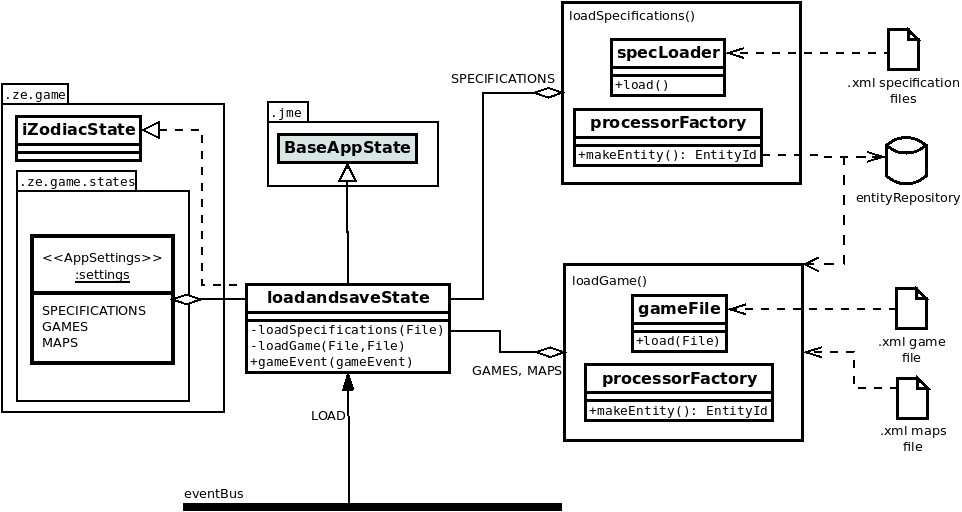
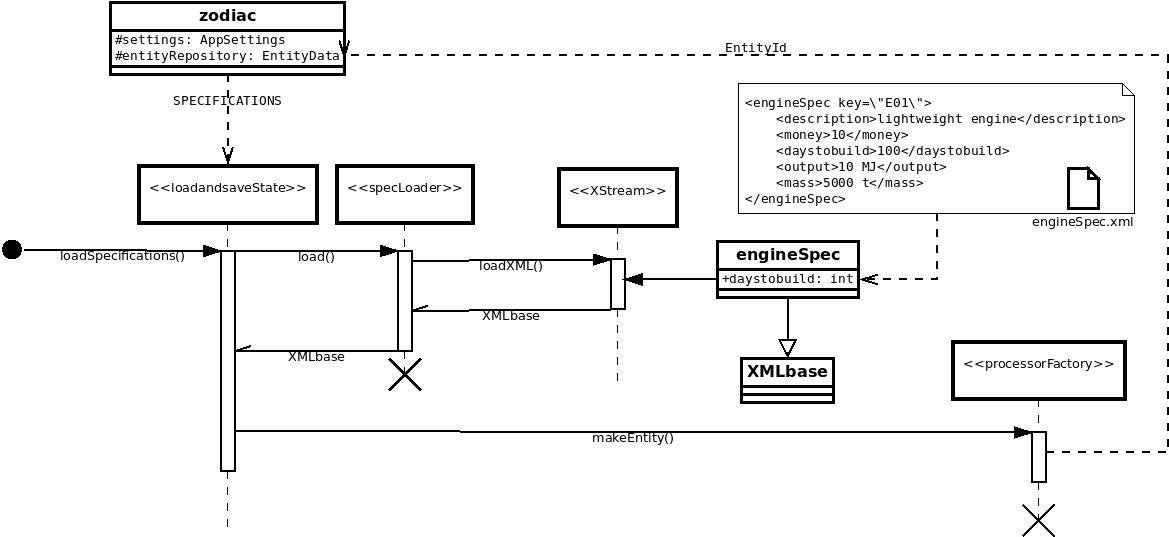
As the state is initialised it will load the specifications, these are XML files describing the fixed properties and features of things such as the mass of engines, or the atmosphere of a class of planet. On a call to loadSpecifications the application settings are used to identify a directory to search. A specLoader processes the files in that directory returning java objects that represent the XML data. Elements in the XML are mapped to java fields through XStream annotations. So in the example, the XML has an element daystobuild, this is mapped to a field int daystobuild in engineSpec.java
One advantage of XStream is that once a schema eg <engineSpec> is registered all XML is processed into the correct java object (eg engineSpec.java) automatically.
loadSpecifications continues by using the returned object and processorFactory::makeEntity to create an Entity in the entity repository with appropriately configured components.
