This document describes how major features of the game are actually implemented in code.
Note that the various UML diagrams are not ‘proper’ UML nor exhaustive, they are just to illustrate various points.
JMonkeyEngine (JME). This code framework provides abilities useful to all games. Key features are ‘application states’ which provide independent processes to control game logic and mechanics, asset management, scene graph management.
Logging allows messages about the progress and state of the game to be output to the console or logged to a file. This is invaluable when developing code, debugging or diagnosing odd-errors.
Since it was a dependency created by JME the code uses the slf4j facade. This provides only very limited abilities but offers a consistent way to make log entries. The facade then requires an underlying real logging system to perform effective logging. By placing the appropriate facade jar (eg slf-log4j-1.7.30.jar) on the classpath a more sophisticated logging system can be used.
The actual logging is implemented by log4j. The now end-of-life version 1 is used since slf4j doesn’t yet seem to support log4j version 2.
log4J is controlled by the log4j.properties file which is loaded at startup. This decides how much detail is output and this can be tuned for each class. Log4j can itself be debugged by adding -Dlog4j.debug=1 to the java virtual machine options (in Netbeans, right-click the project, properties, run and add to the options)
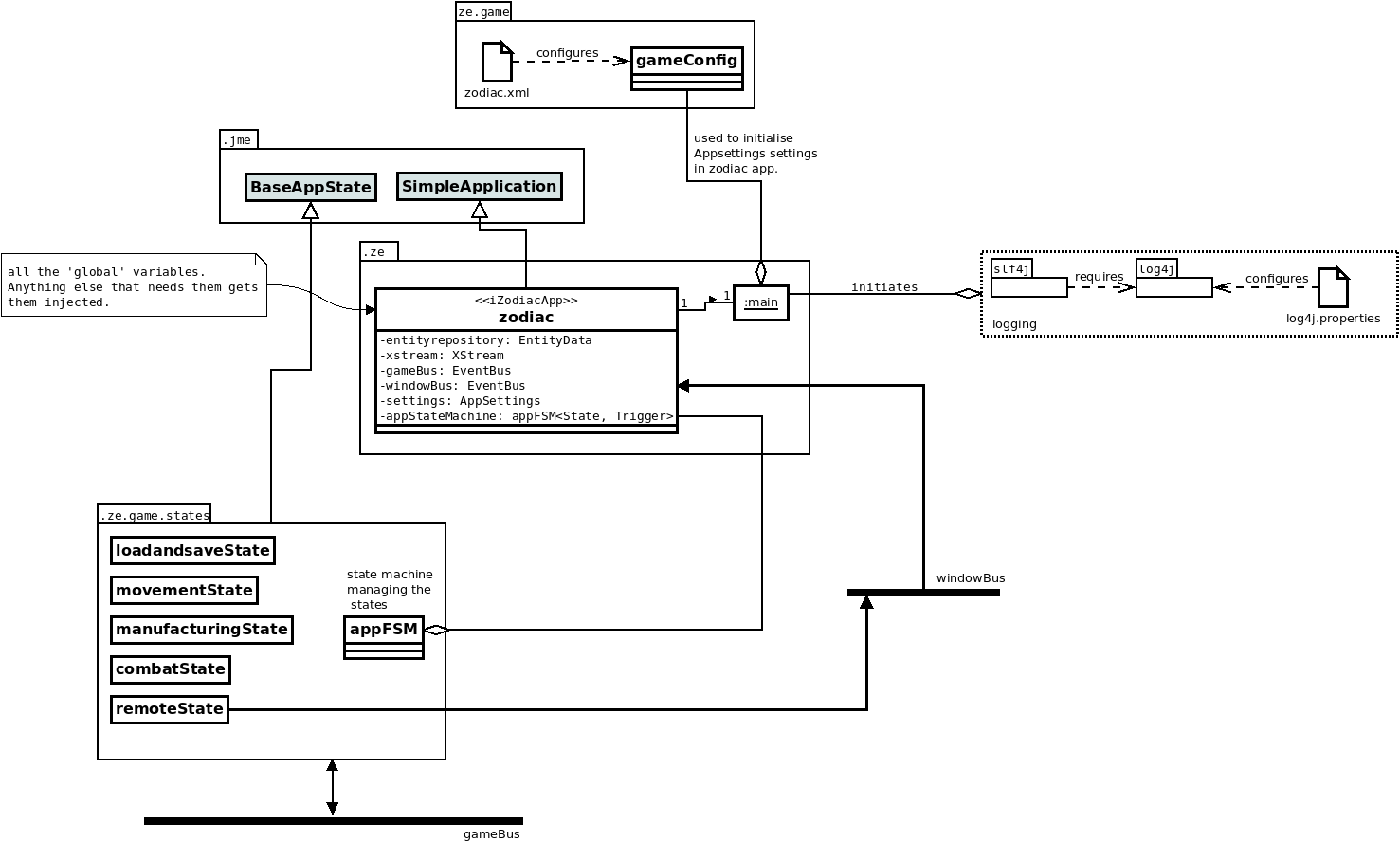
main starts the program, parsing command line options (see the users guide) and initiating the logging system. It then creates and starts the zodiac application (which is derived from JME’s SimpleApplication). The zodiac application contains all the global fields (such as the entity repository). The application states can access these ‘globals’ by access to the running zodiac application via their constructor parameters (as part of extending SimpleApplication). Two eventBuses are available that allow the separated application states and GUI to communicate events of note to each other in a broadcast.
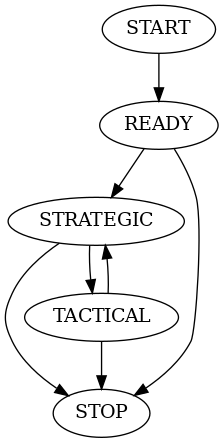
Not to be confused with the application states, zodiac implements a finite state machine to manage the application states. As the major states of the game change this state machine ensures the correct combination of application states are available and enabled.
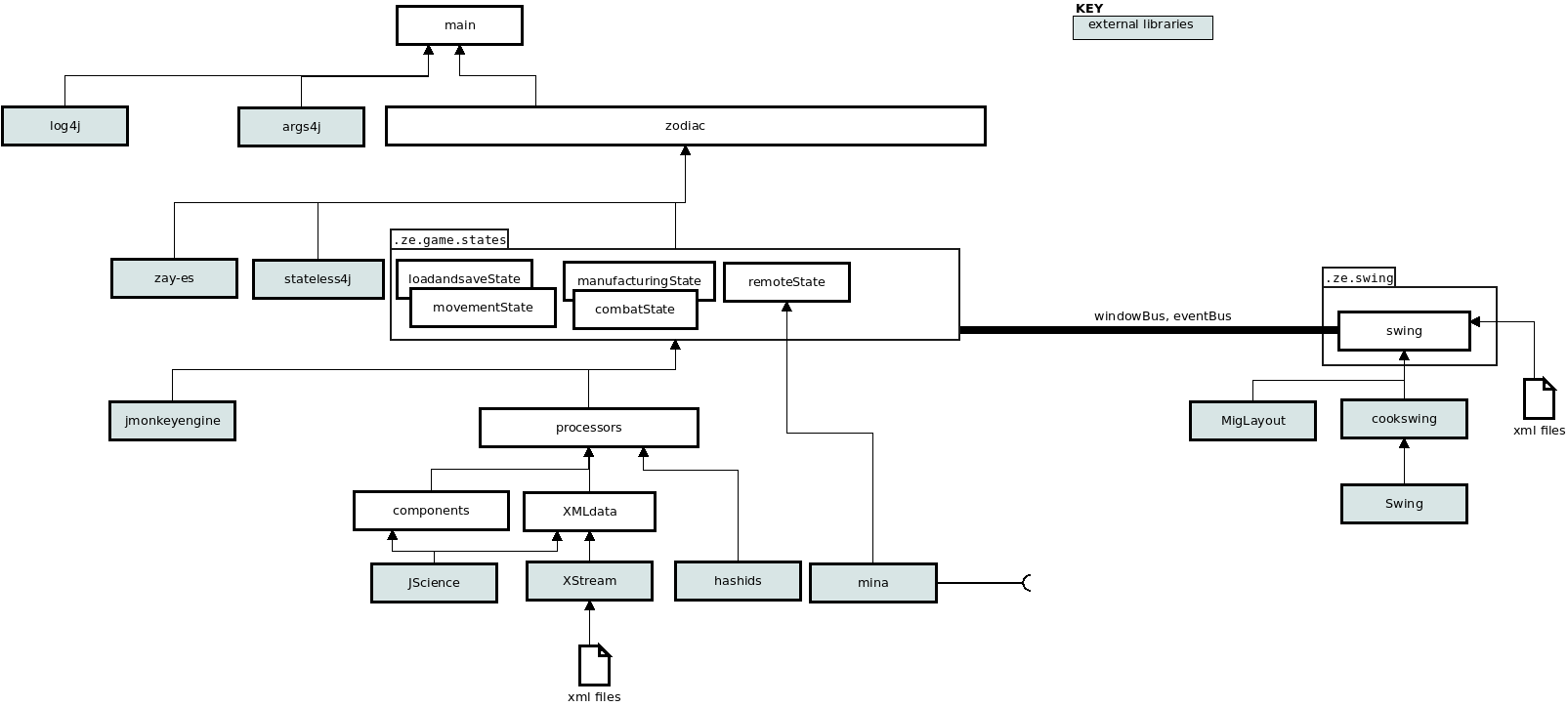
The implmentation doesn’t use a strict layered architecture but there is a hierarchy of dependencies illustrated here.
JME provides the Zay-ES entity-component-system. Entities each have a unique EntityId and associated components which contain data.
Entities are created solely through the global singleton processorFactory. The factory will convert objects created from parsing XML into appropriate entities and components allowing a load/save ability, and it will create or modify entities in response to manufacturing or in-game activity.
While the entities are focused on data, the processors provide functionality. They process an EntityId and in addition to a common interface can provide extra specific functionality. So for example an engineProcessor works on an EntityId that represents an engine and has a function getOutput() which is specific to engines. Processors are transient, created as needed then discarded. Think of them as functions with a parameter (the EntityId).
The processors package feels complex, but this seems to be a consequence of using the entity-component-system architecture and the separation of data from functionality. The aim is that all manipulation of an entities (identified by their EntityId) components is done through a processor, while the logic of interaction between entities is done in the application states which make use of processors. Hence the details of components should be hidden away in the processors with the application states using only processors.

Is a library that uses annotations to wire the contents of an XML format file into a POJO.
The user interface communicates with the separate JME application states not by calling their functions, but by placing a gameEvent onto a global event bus. The eventbus uses annotations to indicate where messages are handled, for convenience these all have the signature “public void gameEvent(gameEvent event)”
The event bus is also used to communicate (where needed) between application states.
The renderState converts the game data held in the entity repository and visualises it in the JMonkeyEngine 3D world of Spatials and Geometries. It is a strictly read-only operation and one that needs to happen frequently (so the display is updated at a high frame-rate) implying it needs to be quick.
The game sets up a Swing interface and instructs JME to perform it’s rendering offscreen and into a memory buffer. That buffer is then ’bit-blit’ed into a Swing JPanel to provide the visualisation.
Construction of new ships and industrial facilities is done through the manufacturing system implemented in the JME application state manufacturingState.java
Manufacturing is initiated by placing a CONSTRUCT gameEvent into the game eventbus.
‘Builders’ actually make things, each is associated with a buildQueue to manage build tickets. Manufacture involves creating an appropriate build ticket and placing it into the appropriate buildqueue. From there the manufacturingState reqularly process the buildQueues to progress tickets appropriately.
Planets are described as a builder because they build builders! The planet, which constantly exists, is used to ‘manufacture’ builders such as industry which in turn manufacture things like engines.
Each planet has an associated warehouse where items can be delivered to. This allows for instance the manufacture of engines and their later use in the manufacture of a ship. The warehouse is considered ‘planetary’ ie it can contain things made on the planet surface by industry and things made in orbit; it’s more of an inventory concept than a physical presence.
| Builder | builds... | delivers to... |
|---|---|---|
| planet | industry, shipyards | planet location, planet orbit |
| industry | engines, shields and other items | planet warehouse |
| shipyard | ships, hulls | planet warehouse (hulls), planet orbit (ships) |
A build ticket is in one of three possible states: BLOCKED, INPROGRESS, COMPLETED. An individual build ticket can have zero or more other build tickets associated as prerequisites which must be completed before the parent ticket can make progress. In this manner an entity such as a ship, which is a collection of other entities, can be manufactured - construction of the hull, engine, shield etc become separate prerequisite tickets. As each ticket is processed it moves through the possible states until completed, triggering a COMPLETED gameEvent message.
This application state provides a facility for a separate application to send and receive data from the running game. This is used for testing, since a test can drive the entire ‘as-delivered’ zodiac application and test the responses.
The state manages a server which awaits connections from clients. The server processes received objects to manipulate the game or transmit responses.

